I've long been fascinated by fancy business cards, ever since I learnt about Kevin Mitnick's lockpick based card.
While scrolling instagram a while back I saw a few videos of people designing PCB business cards. The idea stuck in my brain, but I never saved the links unfortunately.
I wanted to make something radio related, but a full radio on a PCB seemed a bit too advanced for me at this point.
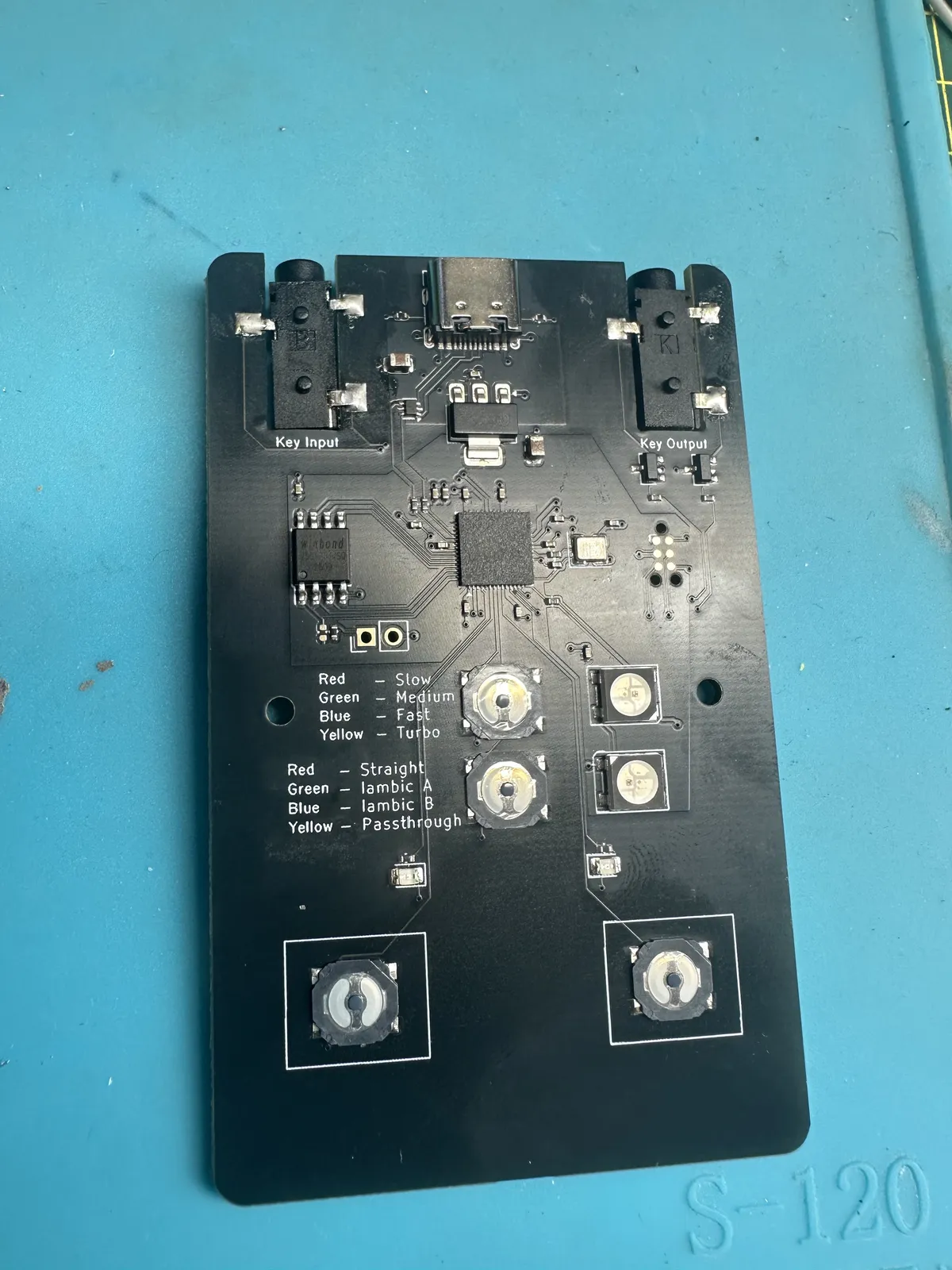
So instead, I built myself a morse key. But it's also a tone generating USB sound card with pass through for connecting a real morse key, or using the card as a key with your transceiver. Or all of the above at once.
I have one of these - How do I upgrade or flash the software?
This should be fairly straightforward. You'll need a bit of wire or similar.
First, grab the latest release. You want the .uf2 file.
- Disconnect the card from everything
- Connect the two pads of the jumper on the left of the board
- While holding the connection, plug the USBC cable in to your PC
- A USB drive should appear on your PC, copy the firmware file to it.
- Wait a moment and the card should reboot with the new firmware.
How do I use it?
There's a few options in the current firmware. Initially, connect the card to your computer with a USB-C cable. A USB-C to A cable will also work. This will then appear as a new sound input called 'Morse Card', selectable in your favourite audio or video conferencing programs (Discord, Zoom, etc).
There's a few modes.
Straight Key
Either button on the left or right of the card will send a tone for as long as you hold it down, exactly like a Straight Telegraph Key.

Iambic A
The left button will send a 'dit', repeating if you hold it down. Right button will send a 'dah', also repeating if you hold it down. Pressing both buttons will send alternating 'dit' or 'dah', finishing exactly when the buttons are released.
Iambic B
This is basically the same as Iambic A, except it will play the 'next' tone in the alternating sequence when one of the buttons are released.
Passthrough
This will not generate an audible tone, but will pass the operations through from a connected key to a connected transceiver (see below).
Other Connections
The card also supports external input and output.
Using the card as a key
Connecting the 'Key Output' with a 3.5mm audio cable to the key input on your transceiver or other device that meets that standard will allow the card to be used as a Morse / Telegraph key. It will still need to be powered for this, however.
Using an external key
The card can also be used to connect a 'proper' key to your computer for use with audio based programs like Discord. Connect the key using a 3.5mm jack to the 'Key Input' socket, and the card will generate tones based on activity of the external key.
Future Enhancements
A future firmware improvement will allow the card to also be used as keyboard based input, similar to the Vail adaptor.
Where's the source?
Get it from the GitHub repository. PRs and patches welcomed!
But it's not business card sized!
I know, but credit card sized is better to hold.